Like many developers, my understanding of clean architecture evolved through experience. Throughout my career, I’ve worked on a variety of projects, each with its own unique challenges and requirements. One of the most significant challenges I faced when working on legacy codebases was the lack of a clear separation between the controllers, the service layer, and the data access layer.
In this article, we’ll explore the Service Layer Pattern, a crucial architectural pattern that sits between your controllers and your data access layer. We’ll discuss why it’s important, how to build a robust service layer in Symfony, and how it can help you create maintainable and scalable applications.
What is the Service Layer Pattern?
Think of the Service Layer Pattern as creating a dedicated department in your application that specializes in handling business operations. Instead of letting your controllers do everything, you create specialized services that focus solely on business logic.
The Service Layer sits between your controllers (which handle HTTP requests) and your data access layer (repositories, ORM, etc.). It’s where your business rules, workflows, and domain-specific operations live.
Here’s where it fits in your application architecture:
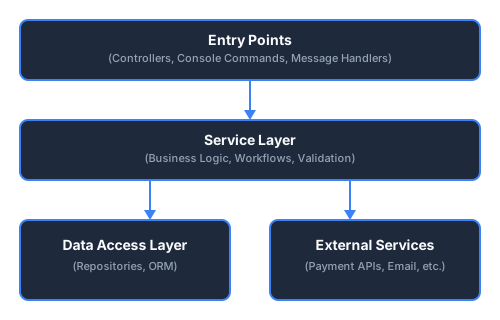
The key insight is that your business logic lives in the service layer, not in your controllers.
Controllers become thin adapters that translate HTTP requests into service calls and service responses into HTTP responses.
Why Your Application Needs a Service Layer?
Let’s understand why the Service Layer Pattern is so valuable:
-
It keeps your controllers slim and focused: Controllers should only handle HTTP concerns, receiving requests and returning responses.
-
It makes your code more reusable: The same business logic can be used by different controllers, commands, event subscribers, and more.
-
It improves testability: Testing business logic in isolation is much easier than testing controllers that mix HTTP and business concerns.
-
It enhances maintainability: When business rules change, you only need to update the relevant service, not every controller that uses it.
When to Use the Service Layer Pattern
Before we dive into implementation, it’s worth knowing when this pattern applies. The Service Layer Pattern is particularly valuable when:
- Your application has complex business rules that go beyond simple CRUD
- You need to reuse business logic across different entry points (web controllers, API endpoints, CLI commands, message handlers)
- You want to write unit tests for your business logic without dealing with HTTP concerns
- You’re integrating with external services or APIs
- Multiple developers are working on the same codebase and need clear boundaries
For very simple CRUD operations with no special business rules, a service layer might be overkill. But as your application grows, you’ll likely find that even simple operations become more complex over time, and having a service layer in place from the start can save you significant refactoring later.
Now, let’s look at what happens when you don’t use a service layer.
The Problem: When Controllers Do Too Much
Let’s look at a real-world example. Imagine you’re building a payment processing system that needs to support multiple payment methods: PayPal, Stripe, Wave, and Orange Money (the last two are heavily used in West Africa). Each payment method has its own API, and each API has its own set of endpoints and data formats.
Without a service layer, your controller might look something like this:
<?php

namespace App\Controller;

use Symfony\Bundle\FrameworkBundle\Controller\AbstractController;
use Symfony\Component\HttpFoundation\Request;
use Symfony\Component\HttpFoundation\JsonResponse;

class PaymentController extends AbstractController
{
    public function __construct(
        private readonly EntityManagerInterface $em,
        private readonly HttpClientInterface $httpClient,
        private readonly LoggerInterface $logger,
        private readonly MailerInterface $mailer,
    ) {}

    public function processPayment(Request $request): JsonResponse
    {
        $user = $this->getUser();
        $amount = $request->get('amount');
        $paymentMethod = $request->get('payment_method');

        // Input validation
        if (!is_numeric($amount) || $amount <= 0) {
            return new JsonResponse(['error' => 'Invalid amount'], 422);
        }

        if (!in_array($paymentMethod, ['paypal', 'stripe', 'wave', 'orange'])) {
            return new JsonResponse(['error' => 'Invalid payment method'], 422);
        }

        $externalPaymentId = null;
        $checkoutUrl = null;

        if ($paymentMethod === 'paypal') {
            // PayPal API configuration
            // OAuth token generation
            // Create payment intent
            // Handle PayPal-specific response format
            // Error handling for PayPal-specific errors
            // ... 50+ lines of PayPal-specific code
        }

        if ($paymentMethod === 'stripe') {
            // Stripe API configuration
            // Create Stripe checkout session
            // Configure line items, success/cancel URLs
            // Handle Stripe-specific response format
            // Error handling for Stripe-specific errors
            // ... 50+ lines of Stripe-specific code
        }

        if ($paymentMethod === 'wave') {
            // Wave API configuration
            // Create Wave checkout session
            // Handle XOF currency specifics
            // Parse Wave-specific response format
            // Error handling for Wave-specific errors
            // ... 50+ lines of Wave-specific code
        }

        if ($paymentMethod === 'orange') {
            // Orange Money API configuration
            // Generate access token
            // Create payment request
            // Handle Orange Money-specific response format
            // Error handling for Orange Money-specific errors
            // ... 50+ lines of Orange Money-specific code
        }

        if (null === $externalPaymentId || null === $checkoutUrl) {
            return new JsonResponse([
               'success' => false,
               'error' => 'Failed to initialize payment'
           ], 500);
        }

        // Save payment to database
        $payment = new Payment();
        $payment->setAmount($amount);
        $payment->setPaymentMethod($paymentMethod);
        $payment->setExternalId($externalPaymentId);
        $payment->setStatus(PaymentStatus::PENDING);
        $payment->setUser($user);

        $this->em->persist($payment);
        $this->em->flush();

        // Send email notification
        $email = (new Email())
            ->to($user->getEmail())
            ->subject('Your Payment is Being Processed')
            ->html($this->renderView('emails/payment_initiated.html.twig', [
                'user' => $user,
                'payment' => $payment
            ]));
        $this->mailer->send($email);

        // Log the transaction
        $this->logger->info('Payment initiated', [
            'user_id' => $user->getId(),
            'payment_id' => $payment->getId(),
            'external_id' => $externalPaymentId,
            'method' => $paymentMethod,
            'amount' => $amount
        ]);

        return new JsonResponse([
            'success' => true,
            'redirect_url' => $checkoutUrl
        ]);
    }

    // Each of these methods would also contain payment method-specific logic
    public function confirmPayment(Request $request): JsonResponse { /* ... */ }
    public function cancelPayment(Request $request): JsonResponse { /* ... */ }
    public function getPaymentStatus(Request $request): JsonResponse { /* ... */ }
    public function handleWebhook(Request $request): JsonResponse { /* ... */ }
}
This approach has several problems:
- The controller is doing too much: It’s handling HTTP requests, validating input, interacting with payment gateways, saving to the database, and sending emails.
- Business logic is mixed with HTTP concerns: This makes testing difficult and maintenance a nightmare.
- Code duplication is inevitable: Similar payment processing logic will likely appear in other controllers, commands, …
- Adding a new payment method requires modifying the controller: This violates the Open/Closed Principle, which states that software entities should be open for extension but closed for modification.
- Each payment method requires its own implementation details right in the controller: With four payment gateways, you’re looking at 200+ lines of gateway-specific code in a single method.
This last point is especially important. Each payment method has its own specific implementation, with different APIs, different data formats, and different error handling. This is precisely the problem that the Adapter pattern (which we’ll cover in another tutorial) will help us solve. But first, let’s see how the Service Layer Pattern can bring order to this chaos.
Implementing the Service Layer Pattern
Let’s refactor our payment processing system using the Service Layer Pattern. We’ll create a PaymentService that encapsulates all payment-related business logic:
<?php
// src/Service/PaymentService.php
namespace App\Service;

use App\Entity\Payment;
use App\Enum\PaymentStatus;
use App\Exception\InvalidPaymentException;
use Doctrine\ORM\EntityManagerInterface;
use Psr\Log\LoggerInterface;
use Symfony\Component\Mailer\MailerInterface;
use Symfony\Component\Mime\Email;
use Symfony\Contracts\HttpClient\HttpClientInterface;

class PaymentService
{
    private const SUPPORTED_METHODS = ['paypal', 'stripe', 'wave', 'orange'];

    public function __construct(
        private readonly EntityManagerInterface $em,
        private readonly HttpClientInterface $httpClient,
        private readonly MailerInterface $mailer,
        private readonly LoggerInterface $logger,
        private readonly string $paypalClientId,
        private readonly string $paypalClientSecret,
        private readonly string $stripeSecretKey,
        private readonly string $waveApiKey,
        private readonly string $orangeApiKey,
    ) {}

    public function processPayment(float $amount, string $paymentMethod, string $userEmail): array
    {
        $this->validatePayment($amount, $paymentMethod);

        $result = match ($paymentMethod) {
            'paypal' => $this->processPayPalPayment($amount),
            'stripe' => $this->processStripePayment($amount),
            'wave' => $this->processWavePayment($amount),
            'orange' => $this->processOrangeMoneyPayment($amount),
        };

        $payment = $this->createPayment($amount, $paymentMethod, $result['external_id']);

        $this->sendPaymentNotification($userEmail, $payment);

        $this->logger->info('Payment initiated', [
            'payment_id' => $payment->getId(),
            'method' => $paymentMethod,
            'amount' => $amount,
        ]);

        return [
            'success' => true,
            'payment_id' => $payment->getId(),
            'redirect_url' => $result['checkout_url'],
        ];
    }

    private function validatePayment(float $amount, string $paymentMethod): void
    {
        if ($amount <= 0) {
            throw new InvalidPaymentException('Amount must be greater than zero');
        }

        if (!in_array($paymentMethod, self::SUPPORTED_METHODS, true)) {
            throw new InvalidPaymentException('Invalid payment method');
        }
    }

    private function processPayPalPayment(float $amount): array
    {
        // PayPal checkout session creation
        // Returns ['external_id' => '...', 'checkout_url' => '...']
    }

    private function processStripePayment(float $amount): array
    {
        // Stripe checkout session creation
        // Returns ['external_id' => '...', 'checkout_url' => '...']
    }

    private function processWavePayment(float $amount): array
    {
        // Wave checkout session creation
        // Returns ['external_id' => '...', 'checkout_url' => '...']
    }

    private function processOrangeMoneyPayment(float $amount): array
    {
        // Orange Money payment request creation
        // Returns ['external_id' => '...', 'checkout_url' => '...']
    }

    private function createPayment(float $amount, string $method, string $externalId): Payment
    {
        $payment = new Payment();
        $payment->setAmount($amount);
        $payment->setPaymentMethod($method);
        $payment->setExternalId($externalId);
        $payment->setStatus(PaymentStatus::PENDING);

        $this->em->persist($payment);
        $this->em->flush();

        return $payment;
    }

    private function sendPaymentNotification(string $email, Payment $payment): void
    {
        $message = (new Email())
            ->to($email)
            ->subject('Payment Processing')
            ->text("Your payment of {$payment->getAmount()} is being processed.");

        $this->mailer->send($message);
    }
}
Now our controller becomes beautifully simple:
<?php

namespace App\Controller;

use App\Exception\InvalidPaymentException;
use App\Service\PaymentService;
use Symfony\Bundle\FrameworkBundle\Controller\AbstractController;
use Symfony\Component\HttpFoundation\JsonResponse;
use Symfony\Component\HttpFoundation\Request;

class PaymentController extends AbstractController
{
    public function __construct(
        private readonly PaymentService $paymentService,
    ) {}

    public function processPayment(Request $request): JsonResponse
    {
        try {
            $result = $this->paymentService->processPayment(
                (float) $request->get('amount'),
                $request->get('payment_method'),
                $this->getUser()->getEmail()
            );

            return new JsonResponse($result);
        } catch (InvalidPaymentException $e) {
            return new JsonResponse(['error' => $e->getMessage()], 422);
        } catch (\Exception $e) {
            return new JsonResponse(['error' => 'Payment processing failed'], 500);
        }
    }
}
The Benefits of the Service Layer Pattern
This refactored code brings several immediate benefits:
- The controller is now focused on its primary responsibility: handling HTTP requests and responses. It’s slim, easy to understand, and only concerned with translating between HTTP and application logic.
- Business logic is properly encapsulated in the PaymentService.
- Error handling is cleaner. We use domain-specific exceptions to communicate what went wrong, and the controller can translate these into appropriate HTTP responses.
- Each responsibility has its own method. The code is more organized, with specific methods for specific tasks.
Reusability in Action
Remember when we said the same service can be used anywhere? Here’s proof. Need to process payments from a CLI command? Just inject the same service:
<?php
// src/Command/ProcessScheduledPaymentCommand.php
namespace App\Command;

use App\Service\PaymentService;
use Symfony\Component\Console\Attribute\AsCommand;
use Symfony\Component\Console\Command\Command;
use Symfony\Component\Console\Input\InputInterface;
use Symfony\Component\Console\Output\OutputInterface;

#[AsCommand(name: 'app:process-scheduled-payment')]
class ProcessScheduledPaymentCommand extends Command
{
    public function __construct(
        private readonly PaymentService $paymentService,
    ) {
        parent::__construct();
    }

    protected function execute(InputInterface $input, OutputInterface $output): int
    {
        // Same service, different entry point
        $result = $this->paymentService->processPayment(
            amount: 99.99,
            paymentMethod: 'stripe',
            userEmail: 'customer@example.com'
        );

        $output->writeln("Payment created: {$result['payment_id']}");

        return Command::SUCCESS;
    }
}
The business logic stays in one place. Whether the payment is triggered by a user clicking a button, a scheduled cron job, or a message queue consumer, the same PaymentService handles it.
Testability in Action
Testing a fat controller requires mocking HTTP requests, dealing with session state, and wrestling with the framework. Testing a service? Just instantiate it with mock dependencies:
<?php
// tests/Service/PaymentServiceTest.php
namespace App\Tests\Service;

use App\Service\PaymentService;
use App\Exception\InvalidPaymentException;
use PHPUnit\Framework\TestCase;

class PaymentServiceTest extends TestCase
{
    public function testRejectsNegativeAmount(): void
    {
        $service = new PaymentService(
            em: $this->createMock(EntityManagerInterface::class),
            httpClient: $this->createMock(HttpClientInterface::class),
            mailer: $this->createMock(MailerInterface::class),
            logger: $this->createMock(LoggerInterface::class),
            paypalClientId: 'test',
            paypalClientSecret: 'test',
            stripeSecretKey: 'test',
            waveApiKey: 'test',
            orangeApiKey: 'test',
        );

        $this->expectException(InvalidPaymentException::class);
        $this->expectExceptionMessage('Amount must be greater than zero');

        $service->processPayment(-50.00, 'stripe', 'test@example.com');
    }

    public function testRejectsInvalidPaymentMethod(): void
    {
        // Similar setup...

        $this->expectException(InvalidPaymentException::class);
        $service->processPayment(100.00, 'bitcoin', 'test@example.com');
    }
}
No HTTP mocking. No framework bootstrapping. Just pure unit tests for your business logic.
But There’s Still a Problem…
While our code is now much better organized, we still have some issues to address:
- Each payment method has its own implementation. We have separate methods for PayPal, Stripe, Wave, and Orange Money, each with its own specific code.
- Adding a new payment method requires modifying the PaymentService. We’d need to add a new method and update the
matchexpression. - The service has knowledge about the specifics of each payment gateway. It needs to know how to work with the PayPal API, the Stripe API, the Wave API, and the Orange Money API.
This is where the Adapter pattern comes in. In our next tutorial, we’ll see how to use this pattern to create a unified interface for different payment gateways, making our code even more flexible and maintainable.
Service Layer Best Practices
Before we wrap up, let’s look at some best practices for implementing the Service Layer Pattern in Symfony:
1. Keep Services Focused
Each service should have a single responsibility. If a service is doing too much, consider splitting it into multiple services. For example, we might want to separate our PaymentService into:
- A PaymentProcessingService for handling payments
- A TransactionService for managing transactions
- A NotificationService for sending notifications
2. Use Dependency Injection
Always use Symfony’s dependency injection container to manage your services. This makes them more testable and flexible. Define your services in config/services.yaml or use auto-configuration:
# config/services.yaml
services:
    App\Service\PaymentService:
        arguments:
            $paypalClientId: '%env(PAYPAL_CLIENT_ID)%'
            $paypalClientSecret: '%env(PAYPAL_CLIENT_SECRET)%'
            $stripeSecretKey: '%env(STRIPE_SECRET_KEY)%'
            $waveApiKey: '%env(WAVE_API_KEY)%'
            $orangeApiKey: '%env(ORANGE_API_KEY)%'
3. Use Meaningful Exceptions
Create domain-specific exceptions to clearly communicate what went wrong. This makes error handling more intuitive and helps maintain consistent error responses:
namespace App\Exception;

class InvalidPaymentException extends \Exception
{
}

class PaymentGatewayException extends \Exception
{
}
Conclusion
The Service Layer Pattern is a powerful tool for organizing business logic in Symfony applications. By separating concerns and creating focused services, you can make your code more maintainable, testable, and flexible.
In this article, we’ve seen how to implement the Service Layer Pattern to improve a payment processing system supporting PayPal, Stripe, Wave, and Orange Money. While our code is now much better organized, we still have some issues with handling different payment gateways. In the next tutorial, we’ll explore how the Adapter pattern can help us create a unified interface for these payment methods, making our code even more flexible and maintainable.
Remember, good architecture isn’t about blindly following patterns. It’s about understanding the problems they solve and applying them thoughtfully to improve your code. The Service Layer Pattern is a great starting point for building clean, maintainable Symfony applications.
Until next time, happy coding!